For some reason there is a requirement to do a computer shutdown (not restart) while running a task sequence, and once the computer starts again there is a need to continue running the task sequence where we left it.
How do you go about that? Let’st start…
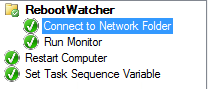
We need two scripts, a task sequence with the ability to run one script and then to start a task sequence controlled restart.
For testing purposes a networkshare was used instead of leveraging a package, but in real-life and in production – all of the files can be placed in a package and executed from there.
This concept is tested within WinPE (using Winpeutil etc…), but you can most likely adapt it to a Windows installation.
Run Monitor
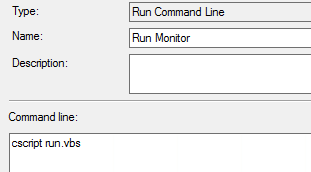
The ‘Run Monitor’ step will kick off a VB-Script that will start a powershell script – and then exit. Simple enough to start a script, and then allow the task sequence to continue with the next steps
VBScript
Runapp "powershell.exe","-noprofile -executionpolicy bypass -file " & GetScriptPatH() & "shutdown.ps1"

Private Function RunApp(AppPath,Switches)
Dim WShell
Dim RunString
Dim RetVal
Dim Success

On Error Resume Next

Set WShell=CreateObject("WScript.Shell")

RunString=Chr(34) &AppPath & Chr(34) & " " & Switches
Retval=WShell.Run(RunString,0,False)

RunApp=Retval

Set WShell=Nothing
End Function

Private Function GetScriptPath
GetScriptPath=Replace(WScript.ScriptFullName,WScript.ScriptName,"")
End Function
The powershell-script (shutdown.ps1) looks as follows;
- Create a TS Environment (so we can read variables)
- Verify if the variable _SMSTSBootStagePath is set
- If the drive-part is longer than a single-letter – we know that the boot-image is prepared and that the reboot countdown has started.
Powershell
$end =$true
write-output "start"

DO
{
start-sleep 2
Get-date
#Remove-Variable -name tsenv -Force -ErrorAction SilentlyContinue
if (!$tsenv) {
try  {
$tsenv = New-Object -COMObject Microsoft.SMS.TSEnvironment
}
catch {
write-output "No TS started yet"
}
}
try  {
$bootpath = $tsenv.Value("_SMSTSBootStagePath") -split ":"
$tsenv.Value("_SMSTSBootStagePath")
if ($bootpath[0].length -gt 1) {
write-output "SMSTSBootStagePath prepped for reboot"
$end = $false
}
}
catch {
write-output "variable not set"
}

} While ($end -eq $true)

start-sleep 5

wpeutil shutdown
Restart
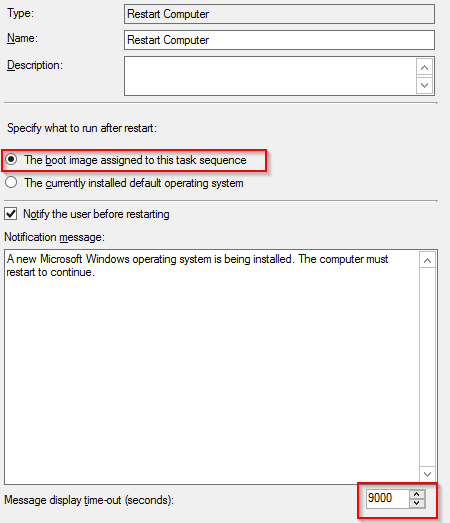
The restart step is fairly generic and you can configure it as you need. A thing to note is that the time-out needs to be higher than the start-sleep within the Powershell-script. As the purpose is to continue within WinPE – the step is configured to start to the boot-image.